> ## Documentation Index
> Fetch the complete documentation index at: https://developers.luccasoftware.com/llms.txt
> Use this file to discover all available pages before exploring further.
# Get Started With Authentication
> Learn how to authenticate to the Lucca API
## In a Nutshell
The Lucca API implements
Client Credentials grant from the OAuth 2.0 authorization protocol.
OAuth scopes are a mechanism to limit an application's access to the resources of the API.
When declaring the application, you can select the scopes given to it. Then, when attempting
to retrieve an access\_token for this application, you may request one, several or all of these
scopes.
Access is also limited through listing business-establishments when declaring your application.
The list of scopes can be found in the [Lucca API reference](../../api-reference/latest/oauth-scopes).
Generating access tokens is handled through a **single global endpoint for ALL Lucca accounts**:
**accounts.world.luccasoftware.com**. Then, API requests may be sent to your dedicated [environment](../get-started/environments).
***
## Authentication Steps
**First, connect to the [environment](../get-started/environments) you want to connect to.**
Authentication requires your code / app to generate an access token from the Lucca API.
For this, please login to your Lucca account, then go to `/identity/admin/integration-keys`. You must have sufficient privileges
to access this page; if you do not, please contact your administrator.
Not sure about the complete URL? [Find out more about environments](../get-started/environments).
You were given access to it? Great, this is where you can create client applications, and manage existing ones.
1. Enter an email address. This will be our technical contact, and we will send emails whenever there's a problem.
You should definitely enter an alias (i.e. a "collective email address"), in order to always keep access to the emails.
2. Give your application a name.
3. List the OAuth scopes your application should be granted.
4. List the business-establishments your application should have access to.
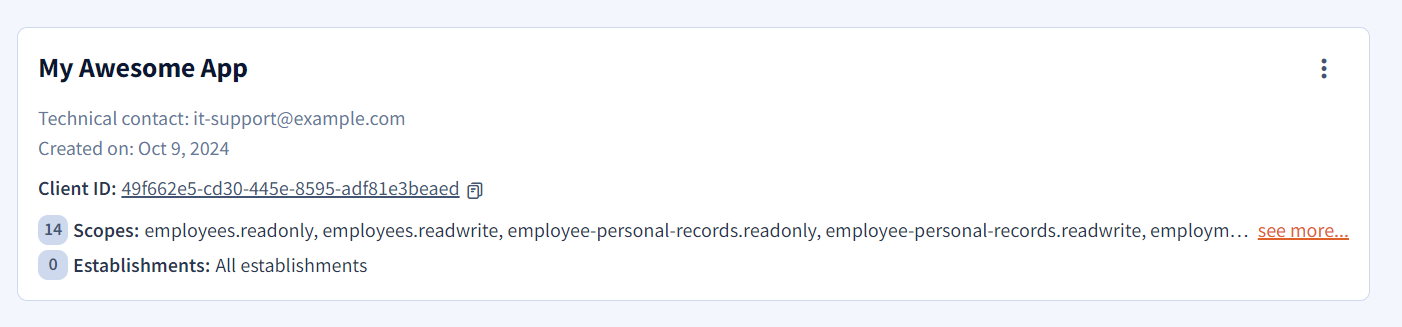 Once done, you get both a `client_id` and a `client_secret`. **Save them** (especially the secret) and **keep them secure**.
Both are needed for authenticating, and you won't be able to view the secret again. If you lose it, you can generate a new one.
We highly recommend creating a new Client Application for every use-case on your side, in order to avoid giving too many scopes to a single app.
This reduces the risk of token leaks.
As you may have already noticed, access rights management is less granular than when managing users' access rights. So keep your `client_secret`
and `access_tokens` secure.
Once done, you get both a `client_id` and a `client_secret`. **Save them** (especially the secret) and **keep them secure**.
Both are needed for authenticating, and you won't be able to view the secret again. If you lose it, you can generate a new one.
We highly recommend creating a new Client Application for every use-case on your side, in order to avoid giving too many scopes to a single app.
This reduces the risk of token leaks.
As you may have already noticed, access rights management is less granular than when managing users' access rights. So keep your `client_secret`
and `access_tokens` secure.
Once your Client Application is created and you have been given a secret, you must exchange both the `client_id` and the `client_secret` with the authorize endpoint in order to obtain an access token.
The Host is **NOT** the usual domain of your Lucca account, but rather a single global one: `accounts.world.luccasoftware.com`.
Content-Type is `application/x-www-form-urlencoded` and **NOT** the usual JSON.
The list of scopes is **space** (" ") delimited.
```http HTTPS theme={null}
POST /connect/token HTTPS/1.1
Host: accounts.world.luccasoftware.com
Content-Type: application/x-www-form-urlencoded
client_id=xxx
&client_secret=xxx
&scope=leaves.readwrite leave-requests.readonly
&grant_type=client_credentials
```
Run in Hoppscotch
 If the request was formatted correctly, the server would respond with the following JSON-encoded payload:
```json JSON theme={null}
Status: 200 OK
Content-Type: application/json; charset=utf-8
...
{
"token_type":"bearer",
"access_token":"XXX...",
"expires_in": 1800
}
```
If the request was formatted correctly, the server would respond with the following JSON-encoded payload:
```json JSON theme={null}
Status: 200 OK
Content-Type: application/json; charset=utf-8
...
{
"token_type":"bearer",
"access_token":"XXX...",
"expires_in": 1800
}
```
Access tokens expire after 30 minutes (1,800 seconds). It is considered good practice to request a new access token for each integration flow.
The given token may be used to issue requests to API endpoints. Forge a normal HTTPS request and include it in the `Authorization` HTTP header:
```http HTTP theme={null}
GET /lucca-api/leaves HTTPS/1.1
Host: example.ilucca.net
content-type: application/json; charset=utf-8
Authorization: Bearer XXX...
Api-Version: XXX
```
API requests should be sent to your own Lucca account Host (i.e. [https://example.ilucca.net](https://example.ilucca.net)). Refer to the [environments](../get-started/environments) documentation.
Using an incorrect or revoked token will result in `401 Unauthorized` response.
Browse the API reference
Attempting to access endpoint with a token that is not granted the required OAuth scope will result in a `403 Forbidden` response.